Customer Dashboard — Marketing
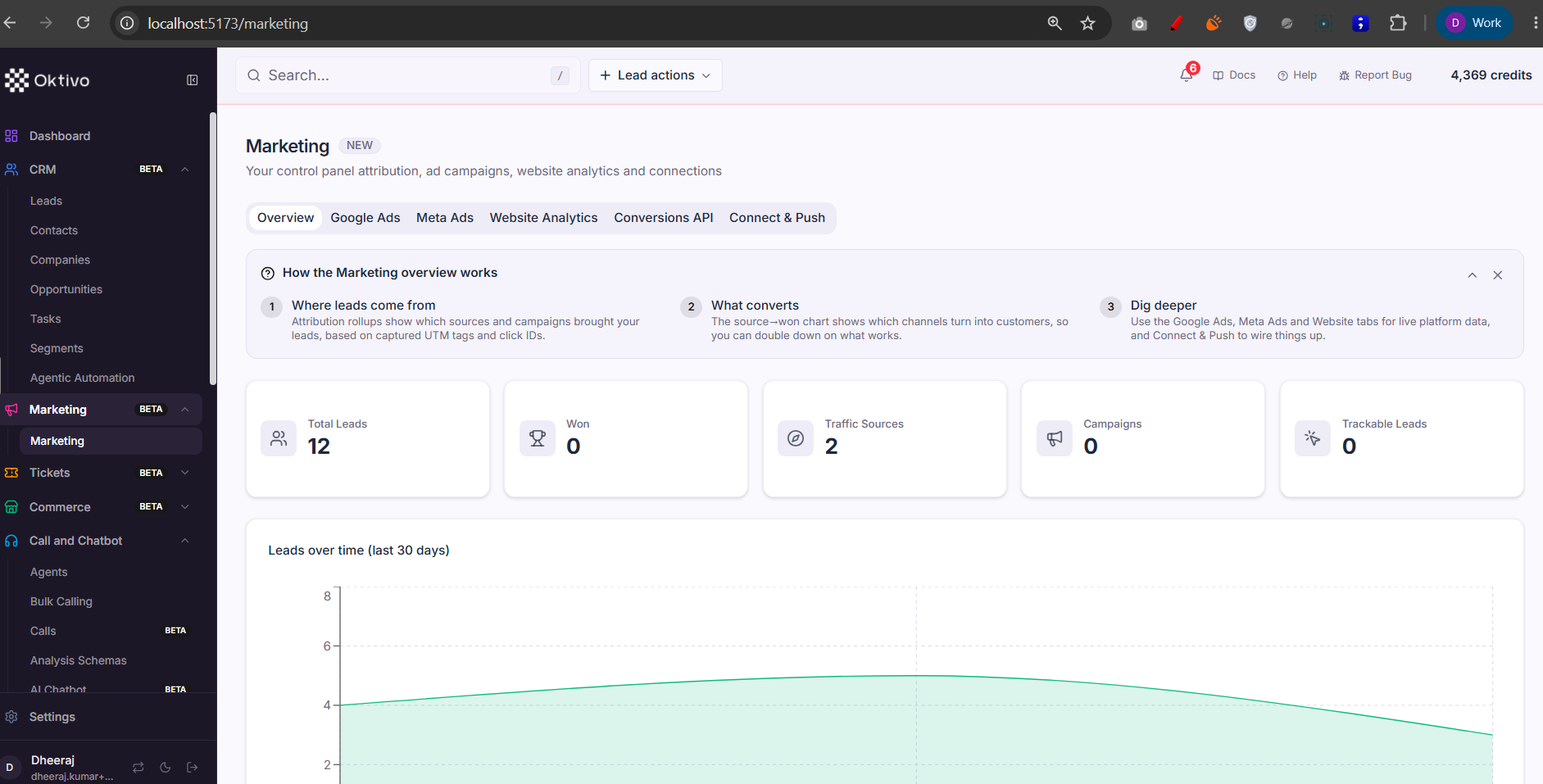
The Marketing section (/marketing) is a lead-source attribution dashboard: it rolls up where leads came from (Manual, Meta/Facebook Lead Ads, Google, imports) and how each source converts, so a customer can judge channel ROI.
Marketing was moved out of the CRM group into its own top-level sidebar item, but it still rides the same entitlement key (
crm.marketing/FEATURES.CRM_MARKETING) and the samecrmRBAC resource — only the placement changed (seeCustomerLayout.tsx).
Screenshots
Architecture Overview
How It Works (Step-by-Step)
- Open
/marketing. The page is gated bycrm.marketing(sub-section) +requirePermission("crm","view"). Without the entitlement the sidebar item hides. - Attribution rollups. The dashboard calls
GET /api/leads/marketing-stats(crmLead.controller.getMarketingStats), which aggregates leads bysource/ UTM attribution across the selected range. Journey rollups come fromGET /api/leads/journey-stats(getJourneyStats), reading CrmLeadJourney. - Meta / Facebook Lead Ads feed marketing. When
facebook_metais on,metaLeadAds.routes.tsmanages Pages, Lead Gen Forms, field mapping, and sync. New Meta leads land in CrmLead with their source/attribution set, and each sync writes a LeadSyncHistory row shown in the sync log. These routes are admin/superadmin-gated. - AI Insights (optional). When the
lead_analyticsentitlement is granted,GET /api/leads/ai-insightsreturns AI-synthesized lead analytics over a scope (account/segment/campaign) and range, plus smart actions that can create a segment. (The AI Insights page is a CRM child; it reuses the same analytics endpoints referenced from Marketing.)
⚠️ Unverified: the Marketing page has a single screenshot (
Marketing/1.png) and its exact card layout was not read from the page component. The endpoint mapping above is derived from themarketing-stats/journey-statsroutes and the Meta Lead Ads routes; treat specific card labels as indicative.
File Reference
| File | Role | Key Functions |
|---|---|---|
app/src/layouts/CustomerLayout.tsx | Marketing nav item (/marketing, crm.marketing) | mainNavItems Marketing group |
routes/crmLead.routes.ts | Marketing + journey + AI-insights endpoints | /api/leads/marketing-stats, /journey-stats, /ai-insights |
controllers/crmLead.controller.ts | Attribution rollups | getMarketingStats, getJourneyStats |
controllers/leadAnalytics.controller.ts | AI insights + smart actions | getAiInsights, getSmartActions, createSegmentFromSmartAction |
routes/metaLeadAds.routes.ts | Meta Pages/Forms/sync (feeds attribution) | listPages, syncForm, listSyncHistory |
controllers/metaLeadAds.controller.ts | Meta sync logic | syncForm, saveFormFieldMapping |
Data Model
| Collection | Why it exists | Key fields |
|---|---|---|
CrmLead | Source/attribution per lead | source, UTM/attribution fields, customerUID |
CrmLeadJourney | Cross-channel journey events | journey steps, timestamps |
LeadSyncHistory | Record of each Meta/Google sync run | provider, formId, counts |
LeadFieldMapping / CrmFieldMapping | Map external form questions → CRM columns | source field → target field |
MetaConnection / MetaPageSubscription | Meta app connection + subscribed pages | tokens, pageId |
API Endpoints
Marketing attribution stats
- Method:
GET - Path:
/api/leads/marketing-stats - Auth:
verifyJwt→requireFeatureAccess(leads)→resolveCrmLeadScope→requireLeadPermission("view") - Response:
200with lead counts/conversions grouped by source.
Journey stats
- Method:
GET - Path:
/api/leads/journey-stats - Auth: same lead
viewchain.
AI insights
- Method:
GET - Path:
/api/leads/ai-insights - Auth: lead
view+lead_analyticsfeature.
Meta: list pages / sync a form
GET /api/meta/pages,POST /api/meta/forms/:formId/sync,GET /api/meta/sync-history- Auth:
verifyJwt→requireFeatureAccess(facebook_meta)→resolveCrmLeadScope(admin/superadmin bar).
External Integrations
- Meta (Facebook/Instagram) Lead Ads — Pages + Lead Gen Forms sync into leads via the Conversions API / Lead webhook. Shares the org's Meta app with WhatsApp. Failures are recorded in
LeadSyncHistory; the "needs matching" alert surfaces unmapped form questions. - Google Ads — offline conversions / Lead Form capture when
google_adsis on (configured in Connecter).
How to Test (End-to-End)
- Grant
crm.marketing; open/marketingand confirm attribution cards render. - Create leads with different
sourcevalues → confirm the source breakdown updates. - With
facebook_metaon, connect a Page, subscribe a form, thensync→ confirm new leads appear withsource=metaand aLeadSyncHistoryentry. - With
lead_analyticson, open AI Insights and generate for a scope → confirm smart actions can create a segment.
Troubleshooting
| Symptom | Cause | Fix |
|---|---|---|
| Marketing hidden | crm.marketing sub-section off | Grant the Marketing sub-section |
| No Meta leads | Page not subscribed or form sync disabled | Subscribe the Page, enable form sync, run a manual sync |
| "Fields need matching" alert | Form questions not mapped to columns | Open the Match fields dialog and map them |
| AI Insights locked | lead_analytics entitlement off | Grant AI Insights (superadmin → org → customer) |