Customer Dashboard — CRM
The CRM group is the customer's sales workspace: Leads, Contacts, Companies, Opportunities, Tasks, Segments, and Agentic Automation. It covers the full pipeline from a raw lead through qualification, deals, and automated follow-up.
Screenshots
Leads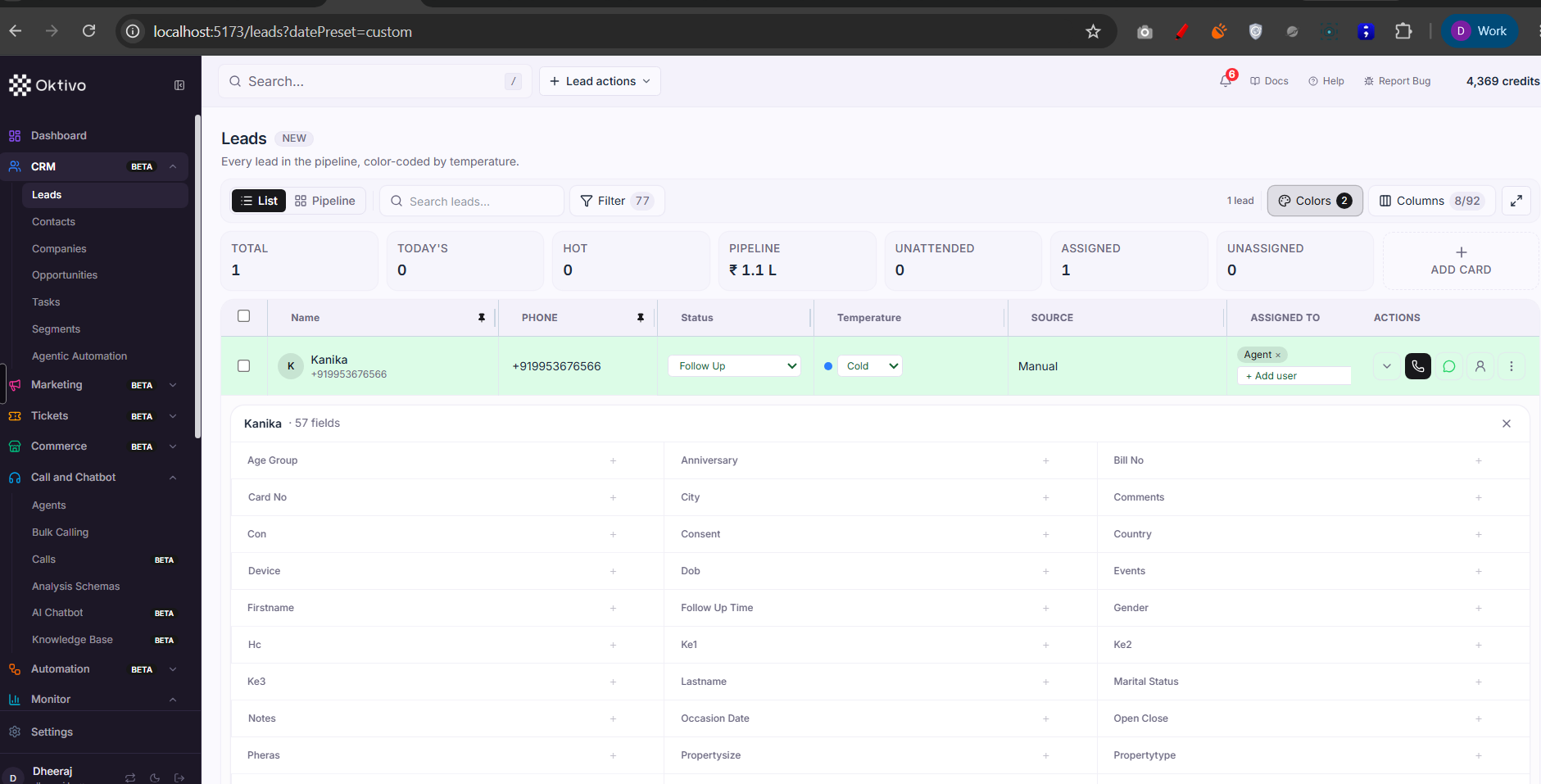
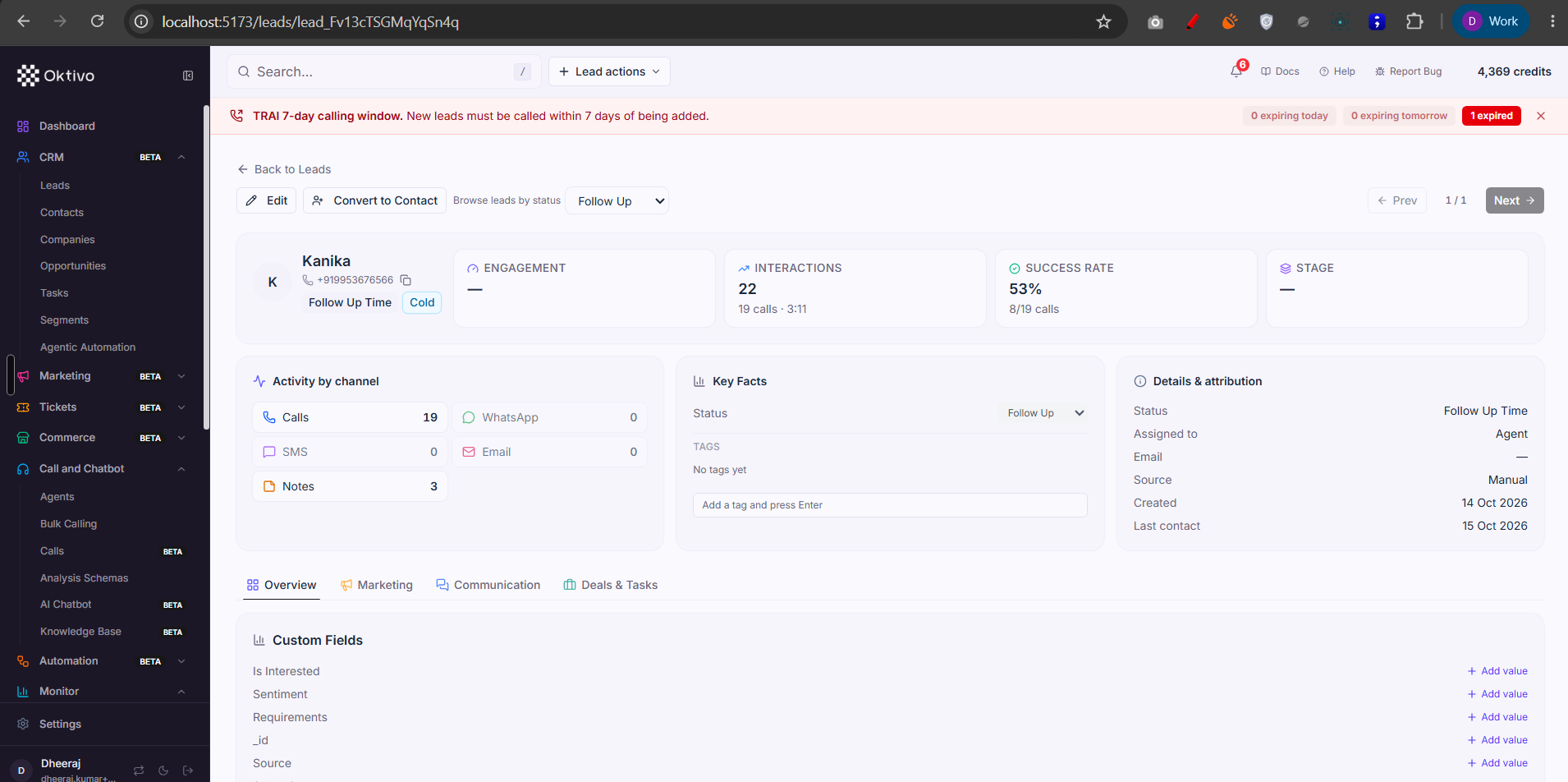
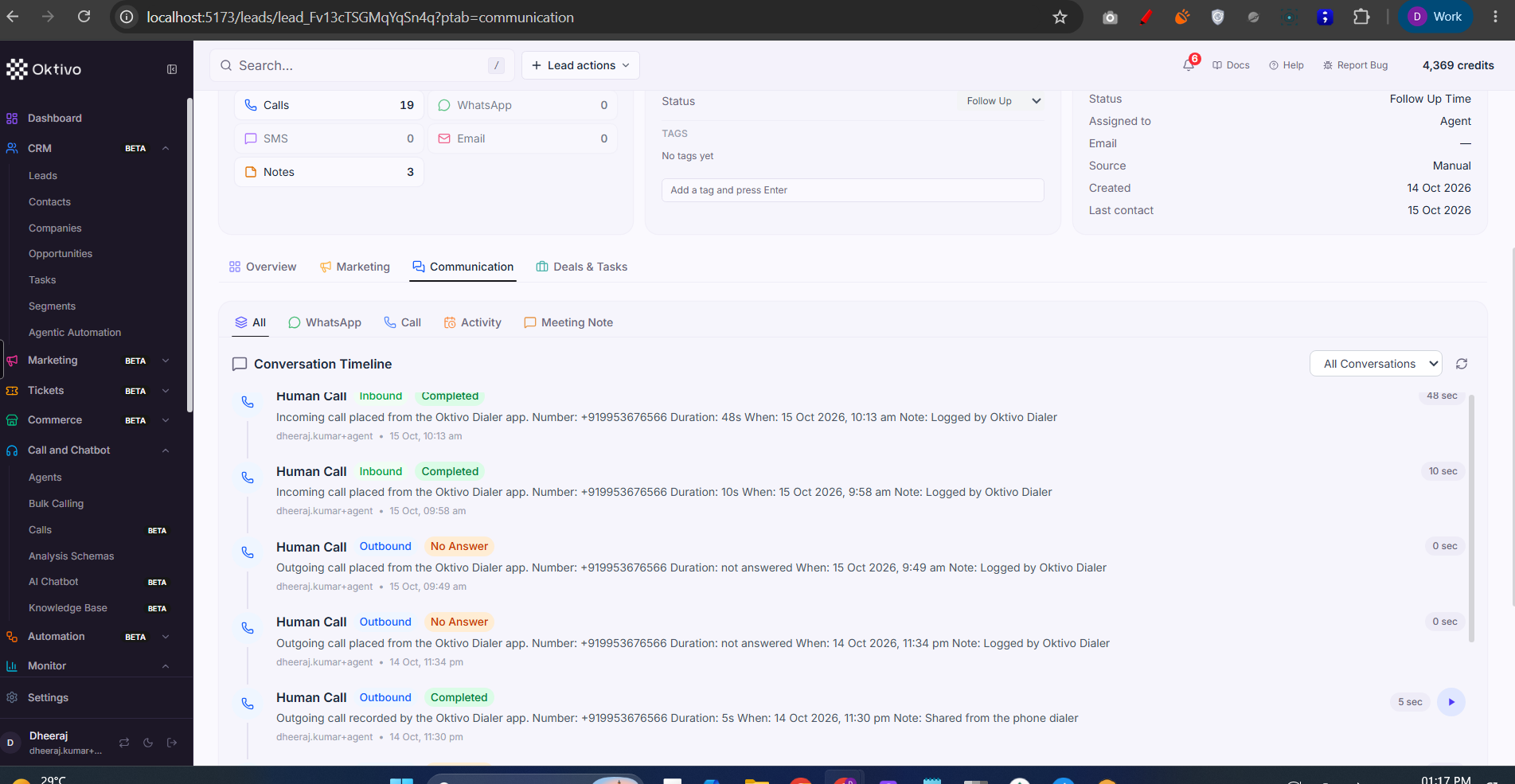
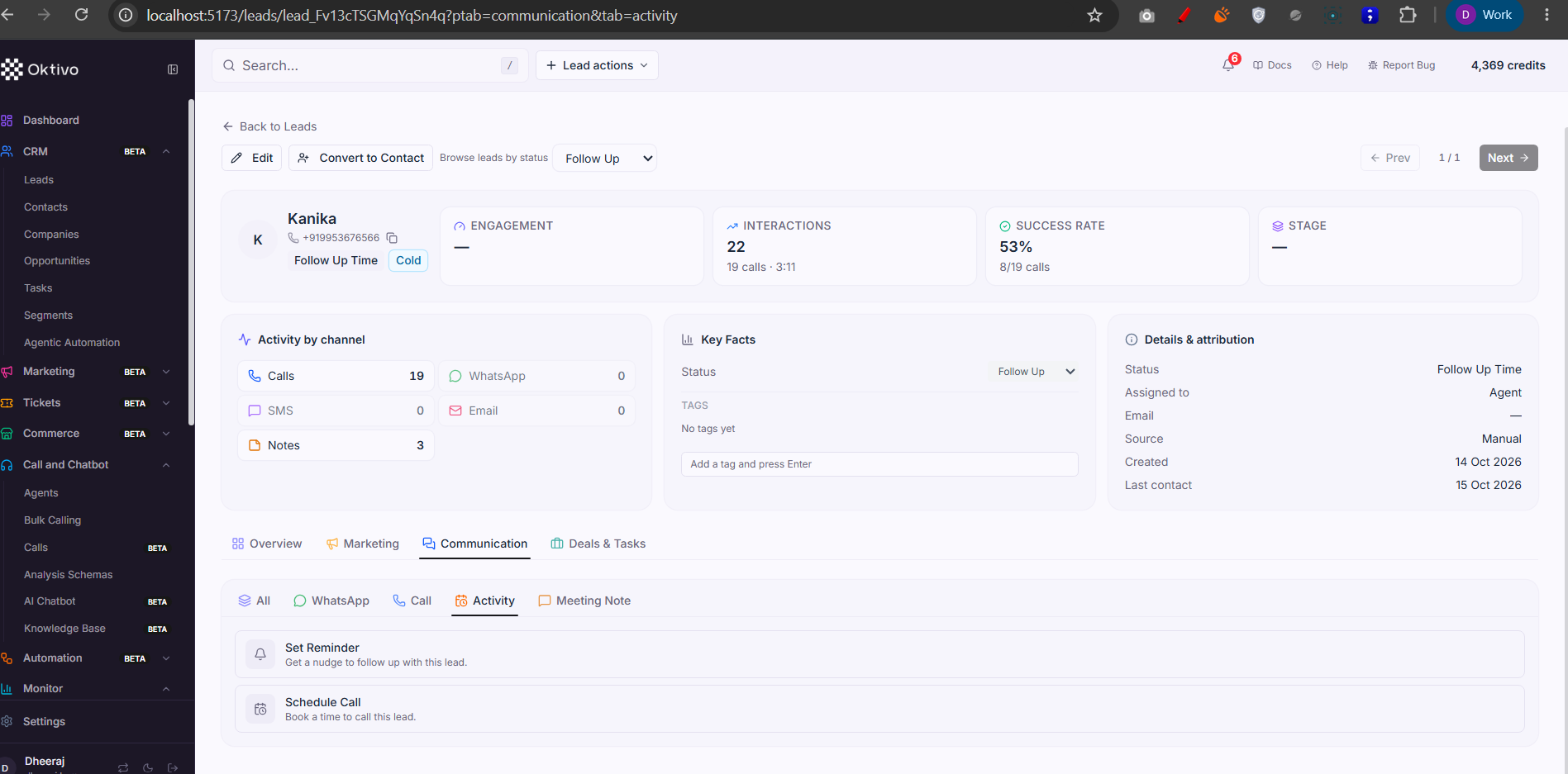
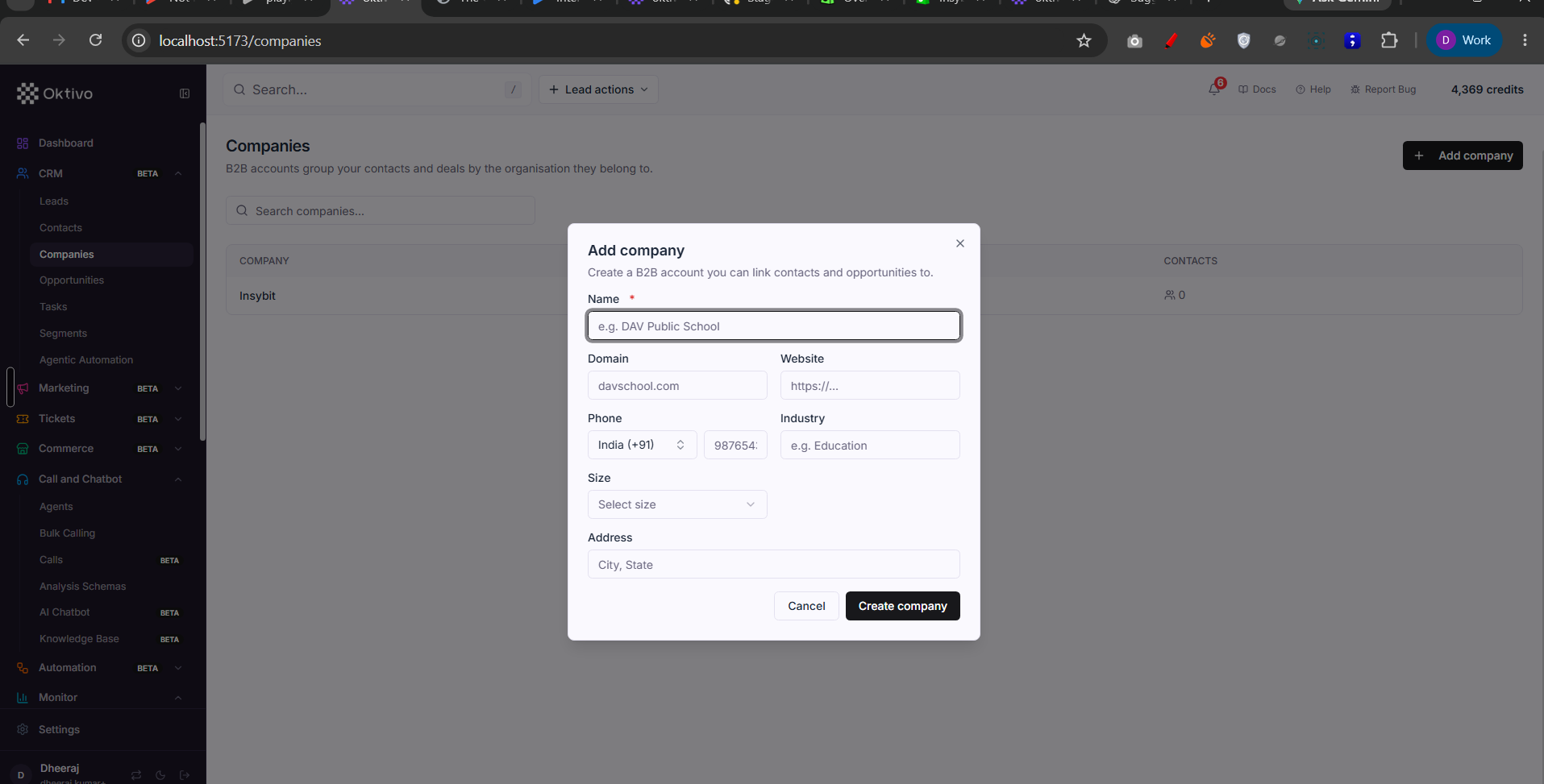
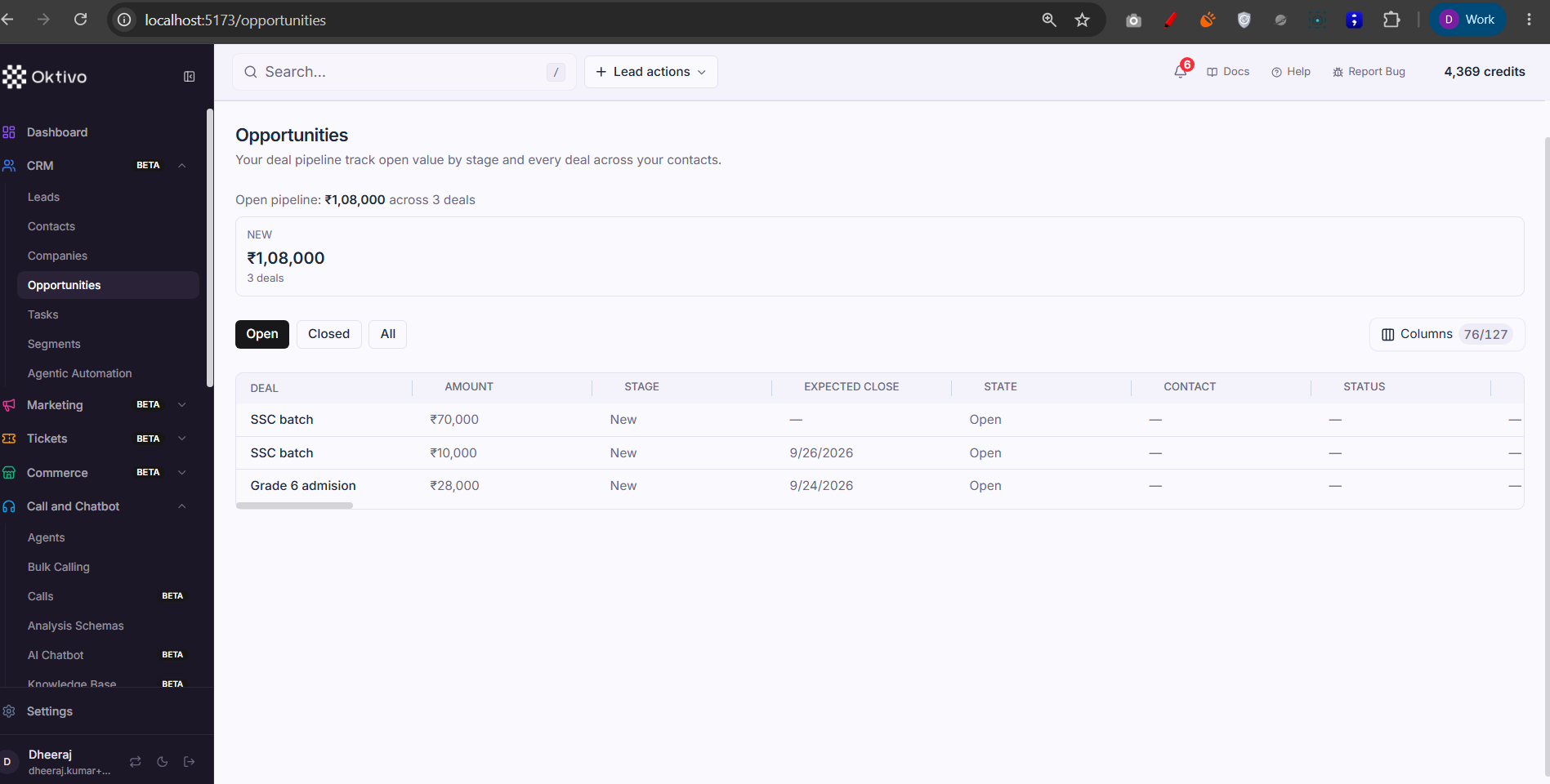
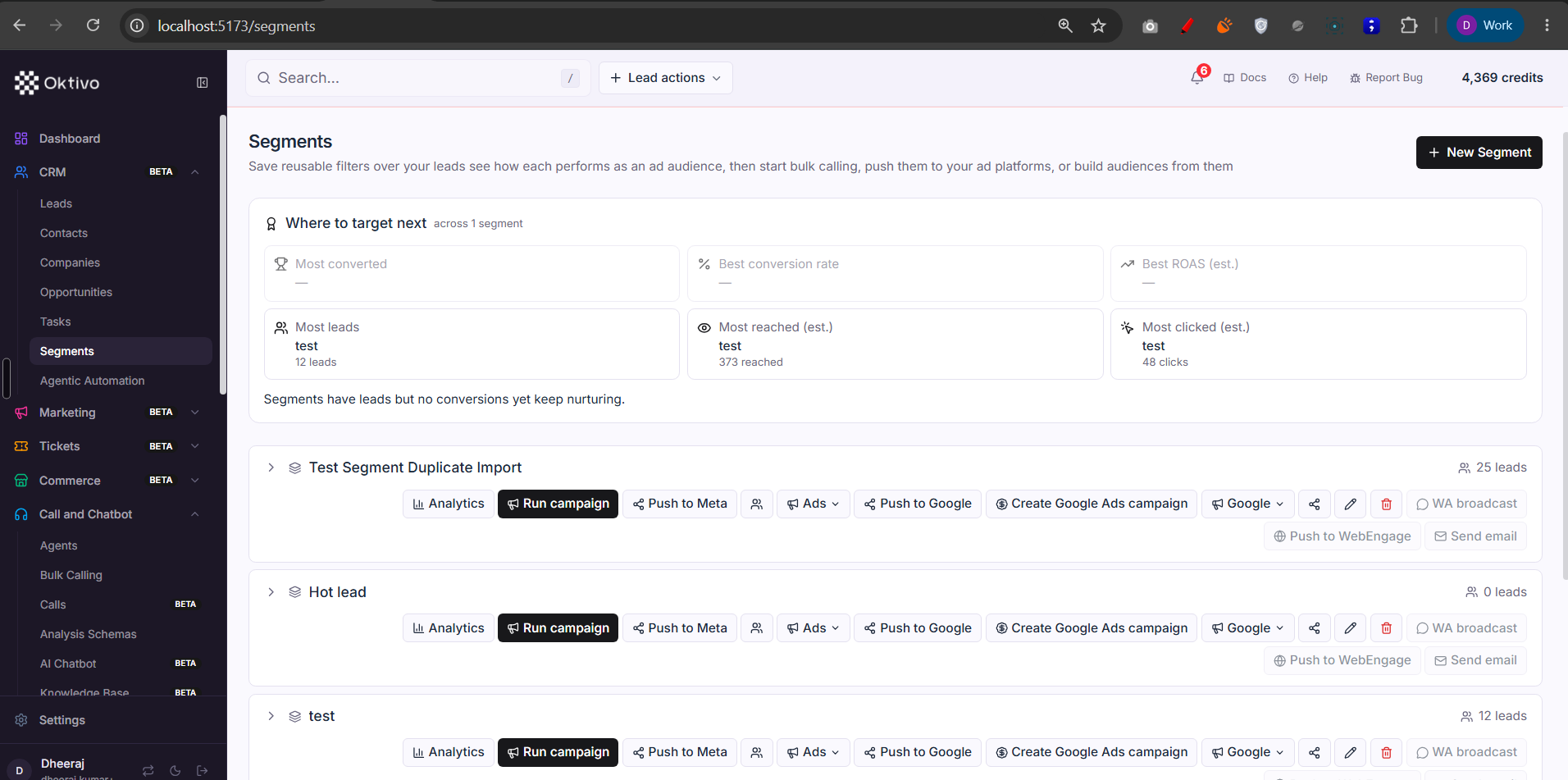
Contacts, Companies, Opportunities, Segments, Agentic Automation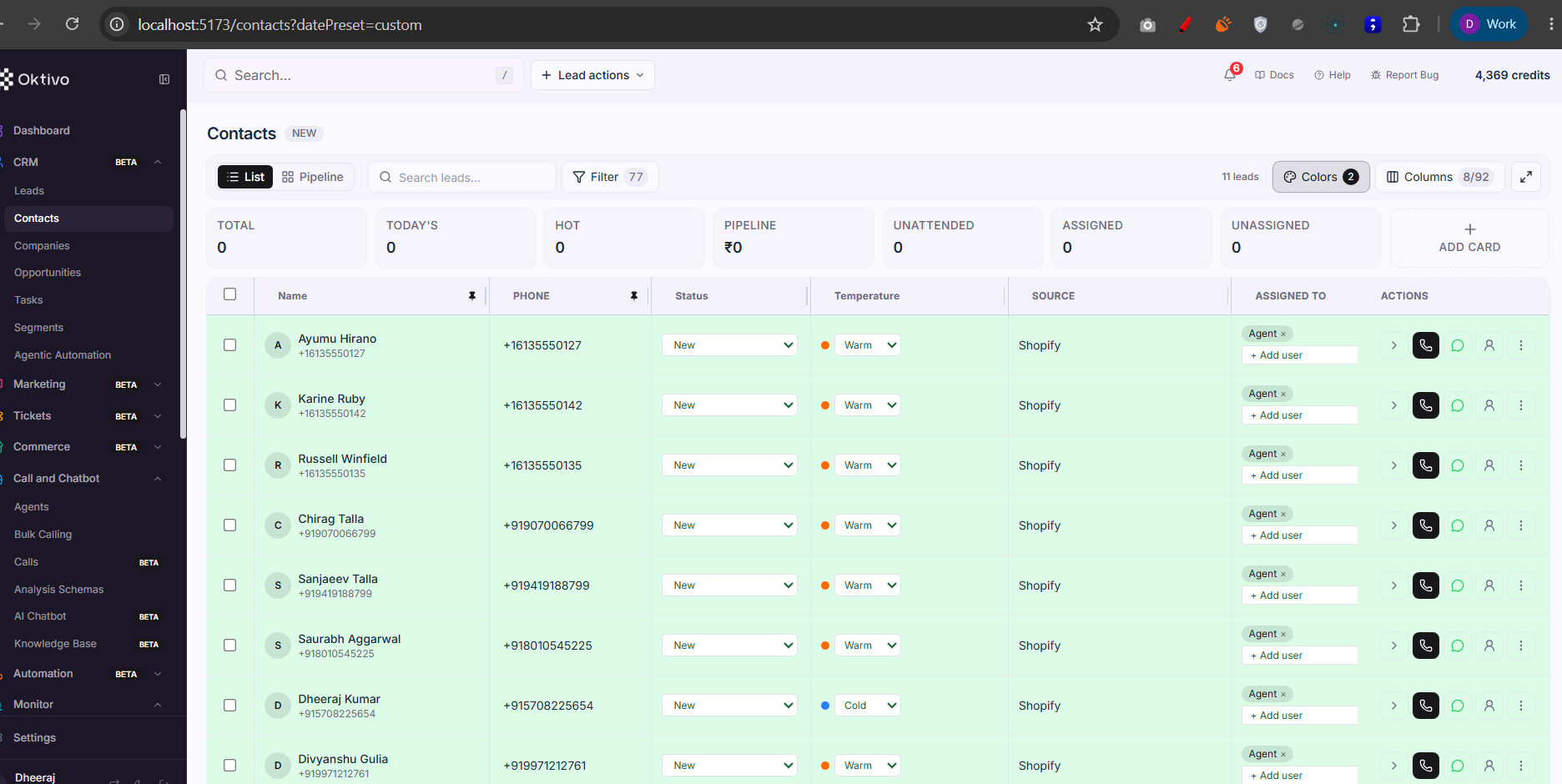
Architecture Overview
Every CRM route runs the same four-layer gate (confirmed in crmLead.routes.ts header):
verifyJwt— identity.requireFeatureAccess(leads/segments module)+requireSubSection("crm.*")— the org granted this section.requirePermission("crm","view")+requireGrant("crm","sub.*")— the team member has the RBAC resource + sub-section grant.resolveCrmLeadScope→requireLeadPermission(view|create|delete|export)— tenant scope + per-action permission.
The four lead actions (view / create / delete / export) are each granted explicitly — holding
crm_leadsalone grants no action. Manager-only writes additionally passrequireCrmOrgManager.
How It Works (Step-by-Step)
1. Leads (/leads, /my-queue, /leads/:id)
- List view (
Leads/1.png): a table with top-bar controls — List / Pipeline toggle, Search leads, Filter (saved filter count), Colors (temperature color rules), Columns (visible/total custom fields, e.g.8/92), and a fullscreen expand. KPI chips show Total / Today's / Hot / Pipeline value / Unattended / Assigned / Unassigned. Each row has inline Status and Temperature dropdowns, Source, Assigned To (+ Add user), and row actions: Call, WhatsApp, Assign, and a⋮overflow menu.- Call places a native/AI call (see CRM Call Integration); WhatsApp opens the WhatsApp composer; Assign reassigns the lead (
PATCH /api/leads/:id/assign, manager-gated).
- Call places a native/AI call (see CRM Call Integration); WhatsApp opens the WhatsApp composer; Assign reassigns the lead (
- Lead detail (
Leads/4.png,Leads/6.png): header with Edit, Convert to Contact, a status browser, and Prev/Next. Summary cards (Engagement, Interactions, Success Rate, Stage), Activity by channel (Calls / WhatsApp / SMS / Email / Notes counts), Key Facts (status + tags), Details & attribution (status, assigned to, source, created, last contact). Tabs: Overview / Marketing / Communication / Deals & Tasks. The Communication tab shows a Conversation Timeline (Human Call / WhatsApp / Activity / Meeting Note), and the Activity tab offers Set Reminder and Schedule Call. - My Queue (
/my-queue): the priority-ranked "just call" surface for team members (agent-only; hidden for owners and for members without thesub.my_queuegrant). - Import (
/leads/import/*): upload a CSV → map columns → execute. Gated bycreate. Writes a CrmLeadImport session, then CrmLead rows. - Settings & custom fields:
GET/PATCH /api/leads/settingsand/api/leads/custom-fields(manager-gated) define the form schema stored in CrmCustomField / CrmOrgSettings.
2. Contacts (/contacts)
- Leads promoted to qualified contacts (the
isQualifiedset). Gated by thecrm.contactssub-section. The History/call-centric contact list is served bycontact.routes.ts(GET /contacts, call summary, analysis, bookmark, feedback); the CRM-style contact list reuses the leads controller in "contacts mode".
3. Companies (/companies, /companies/:id)
- B2B accounts. Reads are
view; writes are org-manager gated because a company is shared org data that many members' contacts hang off. Hidden for B2C customers (thebusinessTypefilter inCustomerLayout).
4. Opportunities (/opportunities)
- Deals; many per contact. List + Pipeline (
GET /api/opportunities/pipeline), create/update, and close/reopen. Writes are not manager-gated (per-contact record), only tenant-scoped.
5. Tasks (/tasks)
- The follow-up work queue across contacts. CRUD plus
/:id/completeand/:id/reopen. Backed by CrmTask; the bell-popup reminders come from CrmReminder viacrmReminder.routes.ts(/api/reminders,/api/reminders/due).
6. Segments (/segments)
- Saved lead filters. Gated by the dedicated
crm_segmentsmodule (sold independently of Leads). Supports count/preview, members add/remove, share, and per-segment ad analytics. A segment can launch a campaign via Create campaign from segment (requires bothvoice_campaignandcrm_segments, plus thewidget.segments.run_campaigngrant — seecampaign.routes.ts).
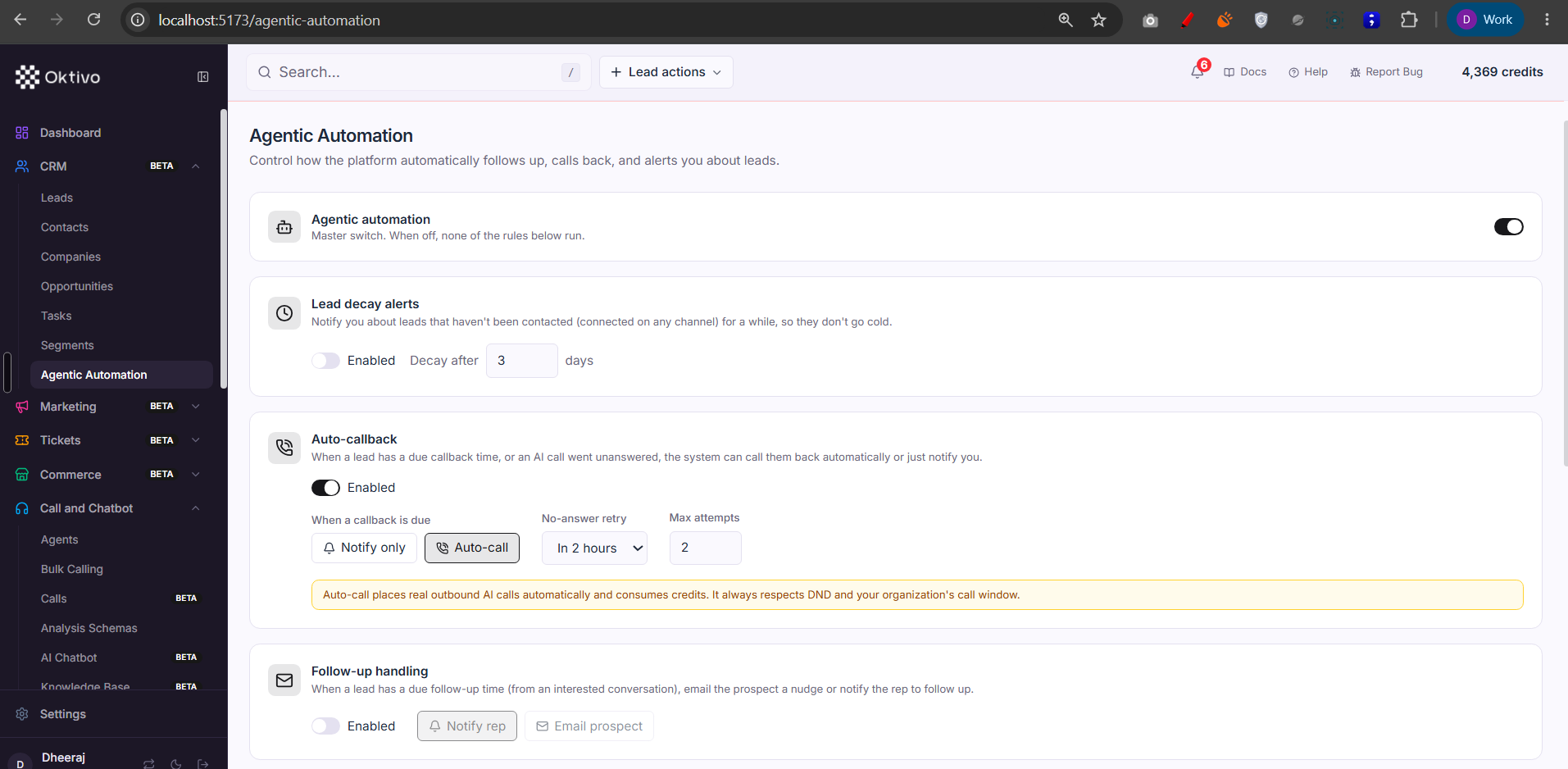
7. Agentic Automation (/agentic-automation)
- Org-level auto-callback / follow-up configuration.
GET /api/agentic-settingsis viewable by anyone who can view leads;PUTis org-manager only because enabling auto-callback places real outbound calls and emails for the whole customer. Stored in CrmAgenticSettings. See Lead Call Agentic Analysis.
File Reference
| File | Role | Key Functions |
|---|---|---|
routes/crmLead.routes.ts | Authoritative leads endpoint + permission table | — |
controllers/crmLead.controller.ts | Lead list/detail/CRUD/assign/bulk | listLeads, getLeadById, assignLead, bulkDeleteLeads |
controllers/crmCustomField.controller.ts | Lead form schema + custom fields | getLeadFormSchema, createCustomField |
controllers/contact.controller.ts | Call-centric contact/history view | listContacts, getContactAnalysis |
controllers/crmCompany.controller.ts | B2B accounts | listCompanies, createCompany |
controllers/crmOpportunity.controller.ts | Deals + pipeline | getPipeline, closeOpportunity |
controllers/crmTask.controller.ts | Tasks | listTasks, completeTask |
controllers/crmReminder.controller.ts | Lead reminders (bell popup) | listDueReminders, snoozeReminder |
controllers/crmSegment.controller.ts | Saved segments | previewSegmentLeads, shareSegment |
controllers/crmAgenticSettings.controller.ts | Agentic auto-callback config | getAgenticSettings, updateAgenticSettings |
Data Model
| Collection | Why it exists | Key fields |
|---|---|---|
CrmLead | The core lead record (pipeline) | customerUID, status, temperature, assignedToUID, custom fields |
CrmLeadIdentity / CrmLeadJourney | Dedup identity + cross-channel journey | phone, email, journey events |
CrmLeadImport | CSV import session + mapping | mapping, status, rows |
Contact | Qualified contact / call record | customerUID, isQualified, call fields |
CrmCompany | B2B account | name, customerUID |
CrmOpportunity | Deal/stage | stage, amount, contactUID |
CrmTask / CrmReminder | To-dos + personal nudges | dueAt, userUID, status |
CrmSegment / CrmSegmentMember | Saved filter + resolved membership | filter, leadUID |
CrmCustomField / CrmOrgSettings | Lead form schema | field defs, businessType |
CrmAgenticSettings | Auto-callback/follow-up config | trigger events, enabled flags |
API Endpoints
Full authoritative table lives in each route file's header. Representative endpoints:
List leads
- Method:
GET - Path:
/api/leads - Auth:
verifyJwt→requireFeatureAccess(leads)→resolveCrmLeadScope→requireLeadPermission("view") - Response:
200paginated leads for the resolved tenant/visibility.
Create / update / delete a lead
POST /api/leads(create),PATCH /api/leads/:id(create),DELETE /api/leads/:id(delete).
Assign a lead (manager)
- Method:
PATCH - Path:
/api/leads/:id/assign - Auth: lead gate +
create+requireCrmOrgManager.
Export leads
- Method:
GET - Path:
/api/leads/export - Auth: lead gate +
requireLeadPermission("export"). See CSV Export System.
Opportunity pipeline
- Method:
GET - Path:
/api/opportunities/pipeline - Auth:
crm.opportunitiessub-section +view.
Agentic settings
GET /api/agentic-settings(view),PUT /api/agentic-settings(view+requireCrmOrgManager).
External Integrations
- LiveKit / telephony — lead Call actions place calls (Web Call / Phone-to-Phone / AI Call). See CRM Call Integration and Campaign Call Flow.
- WhatsApp / Meta — the lead's WhatsApp action and Marketing tab integrate with the WhatsApp workspace (see Connecter).
- CSV import/export — bulk lead I/O. See Lead Import Attribution.
How to Test (End-to-End)
- Grant the customer
crm_leads(+ view/create). Open/leads. - Create a lead → it appears in the list; its stage shows under Dashboard → Lead stages.
- Open the lead detail; use Set Reminder → confirm it surfaces under Tasks and the bell popup when due.
- Convert to Contact → the lead appears in
/contacts. - Create an Opportunity on the contact → confirm it shows in the Pipeline.
- Save a Segment filter, then Create campaign from segment (needs
voice_campaign+crm_segments). - As a team member without the
deletepermission, confirmDELETE /api/leads/:idreturns 403.
Troubleshooting
| Symptom | Cause | Fix |
|---|---|---|
| CRM group hidden | No CRM feature (crm_leads/crm_segments) | Grant a CRM entitlement |
| A CRM child hidden (e.g. Contacts) | Sub-section (crm.contacts) not granted | Grant the sub-section to the org |
| Companies missing | Customer is B2C (businessType) | B2C hides Companies by design |
DELETE/export returns 403 | Action not granted to the team member | Grant crm_leads.delete / crm_leads.export |
| Assign/settings return 403 | Member isn't an org manager | Those writes are manager-only (requireCrmOrgManager) |
| Import rows not created | Import gated by create; mapping incomplete | Grant create; finish column mapping before execute |